






UGC content is dominating TikTok, Instagram Reels, and YouTube Shorts—but editing is where most videos either win or fail. The best creators aren’t just filming—they’re using the right tools to add captions, pacing, hooks, and polish that keep viewers watching.
- 1. Pollo AI — Best for UGC Video Generation & Editing
- 2. Veed.io — Best All-in-One UGC Editing Platform
- 3. CapCut — Best for TikTok-Native Editing
- 4. InShot — Best for Quick Mobile Edits
- 5. Descript — Best for Script-Based Editing
- 6. Canva — Best for Branding & Templates
- 7. VN — Best Free Advanced Mobile Editor
- 8. Kapwing — Best for Collaborative UGC Editing
- Which UGC Video Editing App Should You Use?
If you want to scale content efficiently, choosing the right editing stack matters. Below are eight of the most widely used tools by creators in 2026, each with equal breakdowns so you can pick based on your workflow.
1. Pollo AI — Best for UGC Video Generation & Editing
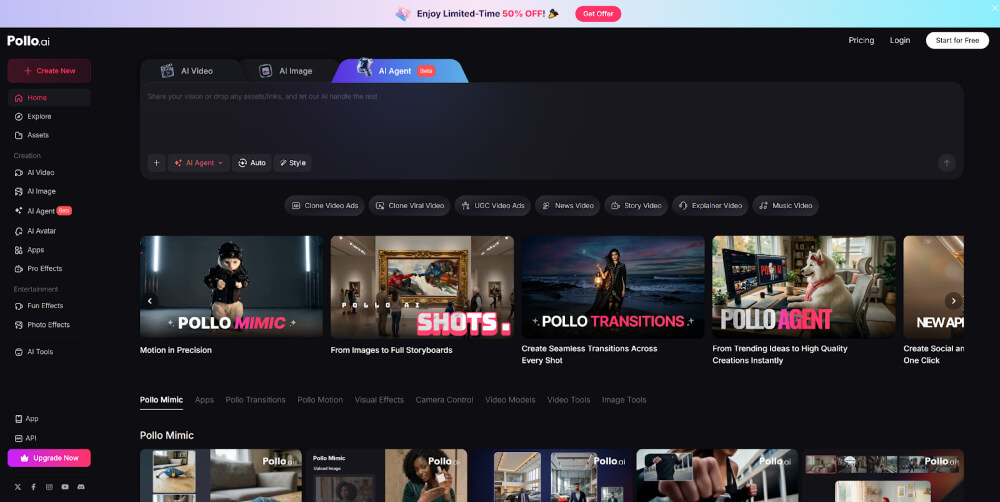
Pollo AI is a hybrid agent that combines editing with AI UGC video generation. This makes it ideal for creators who want to produce UGC-style content at scale without relying entirely on manual editing.
With Pollo AI, you can generate videos from scripts, switch between multiple AI models, and then refine those outputs with editing features. This allows you to test multiple creative angles quickly, which is critical for performance marketing.
Another advantage is its flexibility. Whether you need raw UGC-style clips, stylized ads, or hybrid content, Pollo AI adapts easily. For creators focused on volume and experimentation, it’s one of the most efficient workflows available.
2. Veed.io — Best All-in-One UGC Editing Platform
Veed.io is one of the most practical tools for editing short-form content, especially for creators who want everything in one place.
It combines video editing, caption generation, and branding tools in a single interface. You can cut clips, add subtitles, insert overlays, and export platform-ready videos without switching software. Tools like auto-captioning and template-based editing significantly reduce production time.


Veed is particularly strong for UGC ads because it supports fast iteration. You can duplicate videos, tweak hooks, and create multiple variations in minutes—something that’s essential for TikTok and Meta campaigns.
3. CapCut — Best for TikTok-Native Editing
CapCut is arguably the most widely used editing app among TikTok creators—and for good reason.
It’s built by TikTok’s parent company, which means it’s deeply integrated with the platform’s trends, effects, and formats. Creators can access trending sounds, templates, and visual effects directly inside the app.
CapCut also includes AI-powered features like auto-captions, background removal, and smart cuts, making it extremely efficient for short-form content production.
For anyone creating TikTok-first content, CapCut is almost a default choice.
4. InShot — Best for Quick Mobile Edits
InShot is a simple yet powerful mobile editor that’s especially popular for Instagram Reels and quick UGC edits.
Its interface is clean and beginner-friendly, allowing creators to trim clips, add music, insert transitions, and export videos quickly. Unlike more complex tools, it focuses on speed and ease of use.
For creators who prioritize fast turnaround over advanced editing features, InShot is a reliable option that gets the job done without a steep learning curve.
5. Descript — Best for Script-Based Editing
Descript takes a completely different approach to video editing.
Instead of editing timelines manually, you edit the video by editing text. This makes it ideal for talking-head UGC videos, product demos, and testimonials.
It also includes AI features like filler word removal and voice correction, which can significantly clean up raw footage.
If your UGC content is heavily dialogue-driven, Descript can save a huge amount of editing time.
6. Canva — Best for Branding & Templates
Canva is often seen as a design tool, but its video editor is increasingly popular among UGC creators.
It’s especially useful for:
- Adding branded overlays
- Creating consistent visual styles
- Designing ad creatives and thumbnails
Canva’s strength lies in templates. You can build reusable formats for your videos, which makes scaling content much easier.
For creators working with brands or running paid ads, Canva helps maintain visual consistency across multiple campaigns.
7. VN — Best Free Advanced Mobile Editor
VN Video Editor is a powerful free tool that offers more control than most mobile apps.
It includes:
- Multi-track editing
- Keyframe animations
- Advanced transitions
Unlike simpler tools, VN gives creators more flexibility when building complex edits—without requiring a subscription.
The trade-off is a slightly steeper learning curve, but for creators who want more control without paying for software, VN is a strong option.
8. Kapwing — Best for Collaborative UGC Editing
Kapwing is a browser-based editor designed for teams and collaborative workflows.
It allows multiple users to edit videos, add captions, and leave feedback in real time. This makes it ideal for agencies, brands, or teams managing UGC campaigns at scale.
Kapwing also includes AI tools for resizing, clipping, and captioning, making it easier to repurpose content across platforms.
For collaborative UGC production, it’s one of the most efficient tools available.
Which UGC Video Editing App Should You Use?
The best tool depends on your workflow—not just features.
- Use Pollo AI if you want AI-powered generation + editing
- Use VEED.io for an all-in-one editing workflow
- Use CapCut for TikTok-native content
- Use InShot for quick mobile edits
- Use Descript for script-based editing
- Use Canva for branding and templates
- Use VN Editor for advanced free editing
- Use Kapwing for team collaboration
In 2026, the creators winning on TikTok and Meta aren’t just more creative—they’re faster. And that comes down to using the right editing tools to produce, test, and iterate content at scale.